> For the complete documentation index, see [llms.txt](https://docs.nat2k15.xyz/llms.txt). Markdown versions of documentation pages are available by appending `.md` to page URLs; this page is available as [Markdown](https://docs.nat2k15.xyz/paid-bots/ticket-bot-v2/windows-hosting-guide/mysql-installation-xampp.md).
# 🛢️MySQL Installation (xampp)
Creating a local server environment on your Windows machine with XAMPP and setting up a database for discord bot hosting involves a few steps. This guide will show you how to do it in no time!
### *Installing XAMPP:*
**Step 1: Download and Install XAMPP**
1. **Visit the Official XAMPP Website**: Go to [Apache Friends](https://www.apachefriends.org/download.html) and download the XAMPP installer for Windows.
2. **Run the Installer**: Launch the downloaded installer. You might need to approve the UAC prompt and disable any antivirus temporarily if it blocks the installation.
3. **Select Components**: During installation, ensure that **Apache**, **MySQL**, and **PHP** are selected. You can deselect other components unless you know you'll need them.
4. **Choose Installation Directory**: You can install XAMPP in the default directory (`C:\xampp`) or choose another location. Click Next and proceed with the installation.
5. **Complete Installation**: Follow the remaining prompts and finish the installation.
**Step 2: Start Apache and MySQL**
1. **Launch XAMPP Control Panel in Administrator**: After installation, open the XAMPP Control Panel. You can find it in the Start Menu or where you installed XAMPP.
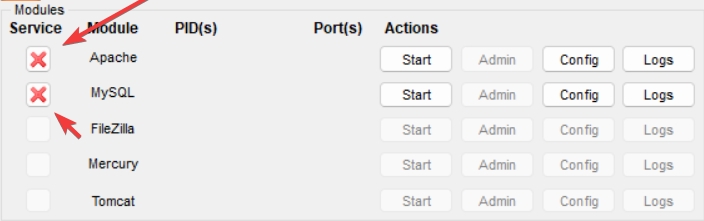
2. **Installing services:** When XAMPP opens up click the ❌ button on the left side of Apache and MySQL and install the services.
1. **Start Apache and MySQL**: Click the 'Start' buttons next to Apache and MySQL. This will run your local server and database server.
**Step 3: Creating The Database**
1. **Open phpMyAdmin: Open phpMyAdmin using the `Admin` Button on Apache.**
2. **Creating a database:** Upon opening phpMyAdmin click new on the top left then type for database name `ticketbot` (all lowercase) then click create.
Congratulations, you now know how to create a bot database. Move on to the next page to continue the installation.